
Your customers are on a journey, but they may not be following the path you think they are. When you don't have a clear picture of their movements across touchpoints, pain points, and decisions, you are effectively flying blind.
That's where a customer journey map comes in. And the statistics support this: companies that have successfully mapped their customer journey have an ROI that is 54% higher than their peers, and 89% of organizations compete on customer experience alone.
However, the majority of companies prepare a customer journey map and then let it collect dust. The difference between a map that gathers insights and one that gathers dust is usually this: not only what to map, but also how to put it into action.
In this guide, we'll break down what a customer journey map actually is, why it matters for your bottom line, and the exact steps to build one that drives real business results.
Understanding Customer Journey Mapping

The customer journey map is a visual representation of all the interactions a customer has with your brand, from the moment they become aware of your brand to well after they've made a purchase.
It's more than just a diagram; it's a strategic tool that documents actions, emotions, touchpoints, and pain points at every phase of the experience of the customer.
Think of it as seeing your business through your customer's eyes. Rather than what is convenient to your operations, you are recording what actually transpires when someone is engaging you across channels, devices, and time.
The market recognizes this value. It is estimated that the client journey mapping software market can expand to up to $76.2 billion by 2035, because organizations have come to the realization that knowing customers on a deeper scale is no longer a nice-to-have, but rather a necessity for survival.
Why Customer Journey Maps Matter: Looking at the Stats
In the current experience-based economy, customer experience ceases to be a soft differentiator; it has direct impacts on retention and revenue. Research shows that 32 percent of customers will cease to transact business with a brand after experiencing a single negative experience, despite having liked the business in the past. The stakes are clear.
When you create a customer journey map, several powerful things happen:
- You identify where customers actually drop off. A comprehensive customer journey map will show at what point during the process customers give up on you. This visibility is priceless, whether it is in the process of onboarding, consideration, or support.
- You increase revenue and satisfaction. Organizations that have streamlined their buyer journey mapping achieve a 10-20% increase in customer satisfaction and a 20% improvement in revenue. That's efficiency and growth working together.
- You personalize at scale. Today, 46% of customers expect personalized communications to trust a brand, and a customer journey map reveals exactly where to deliver that personalization.
The Critical Differences: Map Types Matter
Before you start building, it's important to understand that not every customer journey map has the same purpose. Choosing the right type ensures your effort translates into action.
1. Current State Maps
A current state customer journey map describes the current interaction that your customers have with you. It's diagnostic, revealing inefficiencies, bottlenecks, and pain points in your existing experience. This is the point at which most teams begin, as it makes you look at reality and not assumptions.
For example, Starbucks applied a current state buyer journey mapping to their mobile app experience and found that customers were leaving orders incomplete during mid-transaction. This understanding prompted them to incorporate their loyalty program into the app and made the checkout process easy.
2. Future State Maps
After identifying issues in your customer journey map, you create an ideal future state map. This shows the optimized path you want customers to follow. It's aspirational but grounded in data, showing your team what success looks like.
3. Journey Maps by Industry
Different industries have different customer journey maps. An e-commerce company's customer journey map looks nothing like a SaaS company's, which differs significantly from healthcare. But the core principle remains the same: understand touchpoints, identify friction, and remove obstacles.
Step-by-Step: Creating a Customer Journey Map That Works
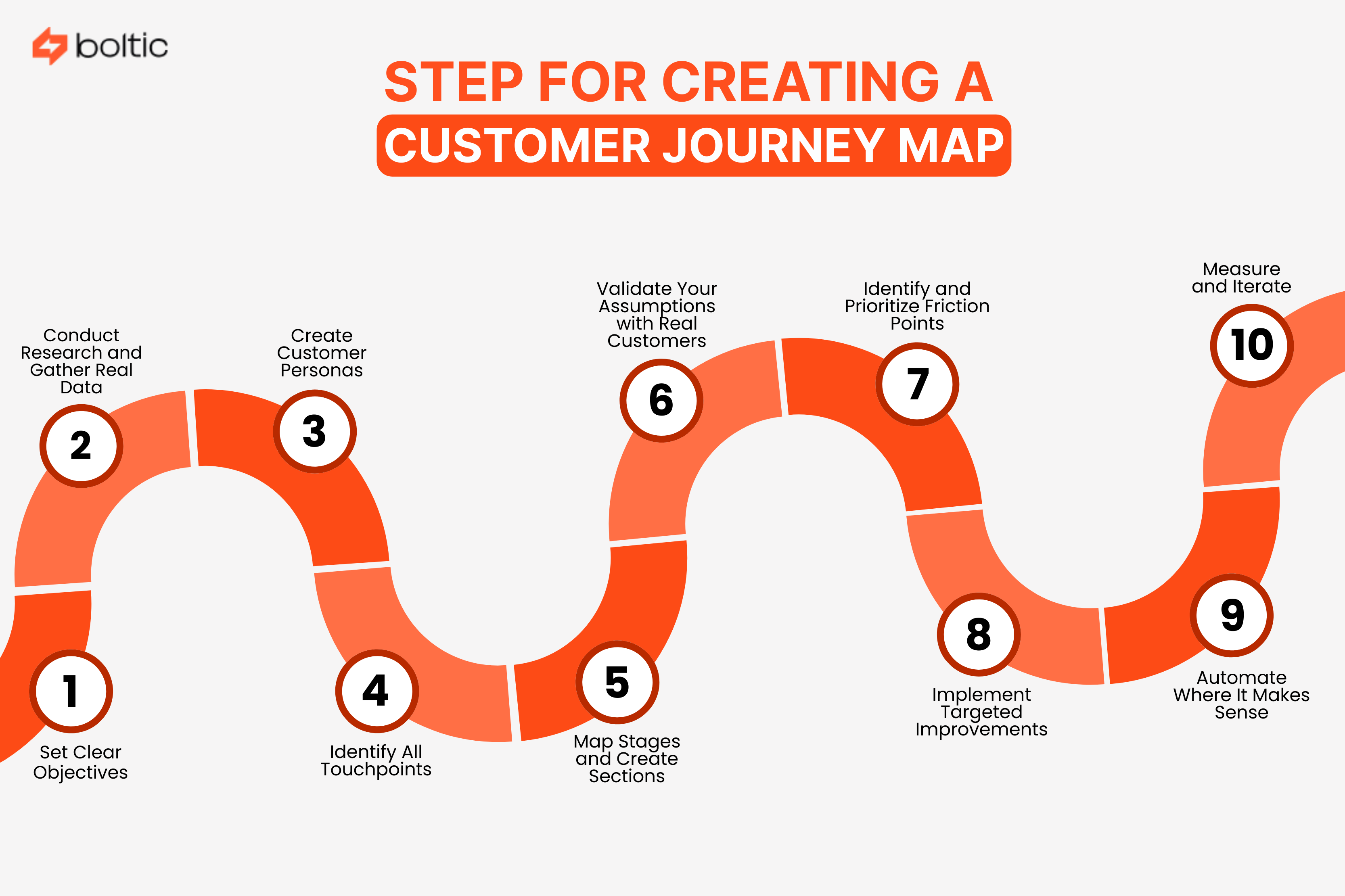
Now, let's look at a 10-step process on how you can build a customer journey map from start to finish.
Step 1: Set Clear Objectives
Start with why. What problem are you solving? Are you trying to reduce churn? Increase conversion? Improve onboarding? The goal you have determines all the things that come after: what information you gather, what groups you target, and how you define success.
Make your objective specific. "Improve customer experience" is too vague. "Reduce customer churn in the first 90 days through the identification and removal of points of onboarding friction" is actionable.
Step 2: Conduct Research and Gather Real Data
Approximately 68% of organizations gather data but fail to employ it well in their customer journey map. Don't be one of them.
Pull from multiple sources:
- Analytics data: Heat maps of websites, patterns of clicks, and session videos indicate the way customers navigate in reality.
- CRM data: Purchase history, support tickets, and communication preferences reveal patterns
- Social listening: Customer sentiment is displayed without any filtering through comments, reviews, and forum discussions.
Real data is necessary to create a proper customer journey map, which indicates reality and not assumptions.
Step 3: Create Customer Personas
Research to create a detailed persona of your targeted groups. A persona is not some arbitrary profile; it is created using actual information on your real customers.
Your persona should include:
- Demographics and professional role
- Goals they're trying to achieve
- Pain points and frustrations
- Favorite communication channels
- Their definition of success
Different customer segments will experience different journeys, and therefore, you might need to have more than one customer journey map per persona.
Step 4: Identify All Touchpoints
Record all the places where your customer engages with your brand. And we mean every. Not only the obvious ones, such as your site and customer care.
Include:
- First knowledge (social media, search results, word-of-mouth, ads)
- Consideration (website, demos, reviews, competitor research)
- Purchase (checkout, payment, sales team, documentation)
- Onboarding and adoption
- Support interactions
Many companies overlook the pre-purchase phase. It is possible that a customer takes weeks to research your solution on Reddit or industry forums before ever visiting your site. Unless you take that into account, your buyer journey mapping will lack completeness.
Step 5: Map Stages and Create Sections
Logically arrange your customer journey map. The normal customer process involves 5-8 steps, but this varies business by business:
Awareness → Research → Consideration → Purchase → Onboarding → Usage → Support → Advocacy
For each stage, create horizontal sections capturing:
- Customer actions: What they actually do
- Touchpoints: Where interactions occur
- Channels: How they engage (mobile, desktop, phone, in-person)
- Emotions: Are they frustrated, excited, or confused?
- Pain points: Where do they struggle?
- Opportunities: Where can you improve?
Tools like Boltic make this visualization seamless. With Boltic's drag-and-drop workflow builder, you can create a customer journey map that isn't just beautiful, but also connected to your actual systems.
When your customer journey map lives in Boltic alongside your automation workflows, customer service teams can see the mapped journey. It also helps them immediately identify where to apply automation to remove friction points.
Step 6: Validate Your Assumptions with Real Customers
This is where most teams stumble. They develop a customer journey map and presume it is correct.
Conduct pilot tests on actual customers. Have them navigate your experience while thinking aloud. Ask where they became confused, where they thought something different was going to happen, and what surprised them. The experience of real users will help perfect your customer journey map.
Step 7: Identify and Prioritize Friction Points
Not every problem is created equal. Prioritize based on impact.
- What is the most common pain point among customers?
- Which creates the highest cost?
- What correlates the most with churn?
With an analysis of your customer journey map, it is possible to identify which areas of friction you can address initially to have the greatest effect.
Step 8: Implement Targeted Improvements
It is here that your customer journey map will be translated into revenue growth. Make it a tool of systematic improvement.
The key to this is that every improvement must target a particular pain point that you identified in your customer journey map.
Step 9: Automate Where It Makes Sense
Real efficiency gains occur with modern client journey mapping + workflow automation.
Consider the following:
- Sending follow-ups based on customer behavior (inactive user, abandoned cart)
- Individualizing messages according to the stage of the journey and history.
- Routing support tickets to the right team automatically
- Gathering responses at the ideal touchpoints.
- Sending reminders or prompts at key moments
Boltic excels here. For example, when a customer finishes the onboarding process and has not used a significant feature, Boltic can track customer journey events and send an automated tutorial or personalized email without human intervention.
This ensures that customers are tracked without your staff having to coordinate all communications manually.
Step 10: Measure and Iterate
Your buyer journey mapping is never a complete document. It is a living strategy tool that changes with your business and customers.
Track metrics specific to each journey stage:
- Awareness: Traffic sources, content engagement
- Consideration: Demo requests, content downloads
- Purchase: Conversion rate, average deal size
- Onboarding: Time-to-first-value, completion rate
- Usage: Feature adoption, session frequency
- Support: Resolution time, satisfaction scores
- Advocacy: NPS, referral rate, churn rate
Companies that measure carefully see compounding improvements. 62% of companies using AI-driven journey mapping tools have reported increased customer retention, which makes sense; you can't improve what you don't measure.
Conclusion
Customer journey mapping isn't a trend. That is the way competitive companies work in 2025. Organizations with strategic planning see higher revenue growth in 70% of cases.
Start with your current state. Gather real data. Develop a customer journey map using cross-functional teams. Then make systemic improvements, automate where appropriate, and measure everything.
Ready to turn your customer journey map into action? Tools such as Boltic allow teams to map the customer journeys, tie them to workflow automation, and make smart improvements without guesswork. When you map your customer experience and automate important touchpoints, you reduce friction and grow revenue.
Your customers will thank you, and your revenue will reflect it.
drives valuable insights
Organize your big data operations with a free forever plan
An agentic platform revolutionizing workflow management and automation through AI-driven solutions. It enables seamless tool integration, real-time decision-making, and enhanced productivity
Here’s what we do in the meeting:
- Experience Fynd Boltic's features firsthand.
- Learn how to automate your data workflows.
- Get answers to your specific questions.