

Product onboarding is the process of guiding new users from their first login to their first actual success in the product. It is not just a welcome screen or a tooltip tour. It is a well-tailored journey that assists users in understanding well what the product does, how it fits in well to their requirements and why it is worth using them again.
For SaaS and digital products, onboarding is the difference between growth and churn. A smooth onboarding experience shortens time to value, enhances activation and sets the base for retention over the long-term period. A confusing one, on the other hand, wastes acquisition spending and slows down product-linked growth.
What Is Product Onboarding?
Imagine inviting someone to a new workspace. You do not just hand them the keys and run away. You show them where things are, what matters, as well as how to get started without being overwhelmed. This is exactly what product onboarding does inside a digital product.
Product onboarding is the end-to-end, in-product experience that assists new users in reaching value quickly as well as building up lasting usage habits. It begins the moment a user signs up and continues until they confidently make use of the product as part of their standard workflow.
It is not a single screen or a one-time walkthrough. Good product onboarding clubs three things in a seamless manner:
- Experience design - interactive tours, tooltips, checklists and contextual prompts that guide users in a stepwise manner
- Helpful content - short explanations, documentation, videos and examples that answer questions at the right moment
- Ongoing communication - in-app messages as well as emails that nudge users forward when they stall/drop off
When such pieces work all together, users do not just learn the product; they experience success early on. This early win is what turns curiosity into a rock-solid commitment.
Product onboarding vs user onboarding vs customer onboarding
Such terms are used in an interchangeable manner. But they do not mean the same thing. Being aware of the difference assists teams in properly designing a good experience as well as assigning ownership.
In short:
- Product onboarding lives inside the product and focuses on helping users succeed through usage.
- User onboarding is broader; it involves everything. This includes a new user experience from signup onward.
- Customer onboarding is common in B2B as well as enterprise settings, which covers commercial as well as operational setup beyond the product itself.
Why is product onboarding critical for SaaS growth?

For most SaaS products, growth does not stall due to the lack of signups. It stalls as users never reach their initial meaningful outcome.
Product onboarding affects:
- Activation rates - Clear guidance assists users in completing the actions that signal actual intent.
- Time to value - The faster users view outcomes, the more likely they are to stick around.
- Retention - Users who experience early success are far more likely to return as well as build good habits.
- Expansion and upsell - Confident users go through advanced features as well as higher-value plans.
- Payback period - Better onboarding results in less wasted acquisition spend as well as faster Return On Investment (ROI).
Poor onboarding has the opposite effect. Users get stuck, skip vital steps or misunderstand the value of the product. The outcome is silent churn, i.e., accounts fade without ever complaining.
Well-designed onboarding does not just teach; it gives value, which aligns user success with business growth.
What are the stages of product onboarding?

Product onboarding is not a single moment; it is a full-fledged journey. Most successful SaaS products go through a clear progression of phases:
1. Pre-onboarding - Sets up expectations before the initial login via signup flows, emails, and messaging.
2. First session - Assists users in orienting themselves as well as understanding what to do first without overwhelming them.
3. Early activation - Guides users to their first meaningful action/outcome, which allows them to realise the product is beneficial.
4. Habit building - Reinforces repeat usage via reminders as well as contextual nudges/progressive feature discovery.
5. Expansion - Introduces advanced features, use cases or upgrades once users are completely confident.
This phase-based view anchors the rest of the guide. This assists you in designing onboarding flows that grow with the user instead of overwhelming them all at once.
How Product Onboarding Works: Stages and Key Components
Product onboarding works best when it mirrors a good conversation, i.e., one that is clear, responsive, and guided step by step. You do not explain everything at once. You listen, respond, and guide the other person in a stepwise manner.
In SaaS, that conversation begins even before a user signs up and continues until they feel completely confident that they can utilize the product on their own. Every phase of the journey has a clear purpose and its own set of onboarding elements.
At a high level, the flow looks like this:
Expectation setting → First experience → First win → Repeat usage → Deeper adoption
You can think of it as a pathway instead of a checklist. When each phase flows in a natural manner into the next, users move ahead without feeling propelled/pushed.
Pre-onboarding: setting expectations before signup
Product onboarding does not begin inside the product; it begins on your website.
Before users create their accounts, they tend to ask silent questions:
- What does this product actually do?
- Is this for someone like me?
- How long will it take to see outcomes?
Clear website copy and short demo videos, as well as interactive previews, assist in answering such questions well. This “primes” users for onboarding by showing up value early as well as minimising any kind of uncertainty.
Effective pre-onboarding includes the following steps:
- Clear positioning as well as use cases on landing pages
- Short product videos that show outcomes and definitely not features
- Interactive demos or sandboxes that permit users to explore without any sort of commitment
When expectations are set correctly, users arrive at the product of their own will.
First-time user experience (FTUE) and welcome moments
The first session is where users decide subconsciously if this product feels worth their time.
A strong first-time user experience eliminates friction as well as creates good momentum. This makes signing up simple and continues with a warm welcome.
Common FTUE elements are:
- Minimal signup fields to minimise drop-off
- Welcome screens that explain what happens next
- Quick role/goal questions to personalise the experience
- Clear calls to action that guide the initial step
In place of saying, “Here is everything you can do,” great onboarding says, “Here is the one thing you must do now and why it matters the most.”
This clarity minimises cognitive load as well as assists users in taking apt and prudent action instead of exploring aimlessly.
Guided setup and the AHA moment
The AHA moment is when a user first experiences the actual value of the product. It is the point where things tend to click well.
This moment looks different for every product. It might be sending the first campaign, creating the first report, or even inviting a teammate. What matters is that it connects well directly to the goal of the user.
Guided setup assists users in reaching that moment faster by removing any sort of guesswork. Common tools are:
- Stepwise checklists that show up progress
- Interactive tours are well-focused on critical actions
- Templates/sample data to avoid “empty state” confusion
- Data imports/integrations that accelerate setup
The goal is not to teach everything; it is basically to guide users to one meaningful success as quickly as possible. Once this happens, motivation takes over.
Ongoing onboarding: feature discovery and habit formation
Onboarding does not end after the first win. That is when the actual relationship begins.
Ongoing onboarding assists users in deepening their understanding base as well as forming habits over time. In place of overwhelming users early, features are introduced gradually and in a contextual manner.
This phase involves:
- Tooltips that appear when a feature becomes relevant
- In-app announcements, which highlight new/underused capabilities
- Lifecycle emails that nudge users back post any inactivity
- Progressive prompts that unlock advanced workflows
The key here is timing. When guidance appears at the moment of need, then it feels helpful and certainly not interruptive. Over time, such minor nudges turn occasional use into regular behaviour.
How long should product onboarding take?
There is no single “right” duration for product onboarding.
It is dependent on the following:
- Product complexity
- User intent as well as experience level
- Whether the product is self-serve or enterprise-focused
This said, one principle holds true across SaaS: the first value moment must happen fast, usually within the first session or first few days.
Everything else can unfold gradually throughout multiple sessions. Effective onboarding respects user time. Also, it delivers value early and continues to support growth with zero need to make you feel rushed/overwhelmed.
Best Product Onboarding Tools in 2025
Zeroing in on the correct onboarding software can change how quickly users reach value and even how consistently they adapt to certain features. Some tools have a focus on no-code experiences for growth teams. However, others endow deeper customisation for complex SaaS products.
Below is a comparative analysis of popular product onboarding tools in the year 2025, followed by short summaries to help you understand well where each tool fits best.
1. Appcues
Appcues is a popular no-code onboarding platform, which is used by SaaS teams to build in-app experiences without any engineering effort. It is well-suited for product-led growth teams focused on activation.
Key features :
- Interactive product tours
- User segmentation and targeting
Pricing - Starts at approximately $249 per month.
2. Userpilot
Userpilot assists teams in creating personalised onboarding flows using behaviour-based triggers as well as feature tagging, which makes it easier to guide users in a contextual manner.
Key features :
- Feature adoption tracking
- No-code in-app experiences
Pricing - Starts at approximately $249 per month.
3. Pendo
Pendo combines onboarding with deep product analytics, making it a strong choice for teams that want insights and guidance in one platform.
Key features :
- In-app guides as well as walkthroughs
- Product usage analytics
Pricing - Custom pricing is dependent on scale.
4. WalkMe
WalkMe is built for large and complex products with enterprise environments where automation, compliance and training matter as much as onboarding.
Key features :
- Automated workflows
- Enterprise-grade onboarding
Pricing - Custom pricing.
5. UserGuiding
UserGuiding offers a simple setup as well as an affordable entry point for startups looking to implement onboarding quickly.
Key features :
- Onboarding checklists
- Tooltips as well as modals
Pricing - Begin at approximately $89 per month.
6. Intercom
Intercom is best known for customer messaging, but it also plays a strong role in onboarding through in-app messages and lifecycle emails.
Key features :
- In-app chat and messages
- Onboarding email automation
Pricing - Starts at approximately $39 per month.
7. Chameleon
Chameleon focuses on highly customisable in-app experiences that match your product’s look and feel.
Key features :
- Micro-tours and tooltips
- UI customisation
Pricing - Starts at approximately $279 per month.
8. Whatfix
Whatfix is widely used in enterprise SaaS for guided training and onboarding across complex applications.
Key features :
- Step-by-step guided flows
- Enterprise onboarding support
Pricing - Custom pricing.
9. Product Fruits
Product Fruits is a cost-effective tool focused on simple onboarding, announcements, and user guidance.
Key features :
- Interactive tours
- In-app announcements
Pricing - Begin at nearly $79 per month.
10. Gainsight PX
Gainsight PX clubs onboarding with customer success insights, which assists teams in connecting activation to retention.
Key features :
- User journeys and funnels
- Behavioral analytics
Pricing - Custom pricing.
11. Mixpanel
Mixpanel is not an onboarding builder. But it is widely utilised to measure onboarding success via activation and retention metrics.
Key features :
- Funnel and cohort analysis
- Activation tracking
Pricing - Free plan available, paid plans scale with usage.
12. Heap
Heap automatically captures user interactions, which makes it easier to analyse onboarding without any manual event setup.
Key features :
- Auto-captured analytics
- User behaviour insights
Pricing - Free as well as paid plans are available.
13. Amplitude
Amplitude is a leading product analytics platform. This is often paired with onboarding tools to optimise flows as well as experiments.
Key features :
- Cohort analysis
- Product experimentation
Pricing - Free plan available, paid plans for advanced needs.
14. Stonly
Stonly combines onboarding with knowledge bases, making it ideal for help-led product experiences.
Key features :
- Interactive guides
- Knowledge-based onboarding
Pricing - Begins at nearly $249 per month.
15. Intro.js
Intro.js is a lightweight and developer-friendly option for easy product tours with zero recurring SaaS costs.
Key features :
- Simple guided tours
- Open-source flexibility
Pricing - Free for basic use, as well as paid licenses available.
16. Shepherd.js
Shepherd.js is best for teams that want full control over onboarding through custom code.
Key features :
- JavaScript-based tours
- Full customisation
Pricing - Free.
17. Inline Manual
The inline manual has its focus on contextual assistance. Also, it focuses on documentation, which is embedded directly inside the product.
Key features :
- Contextual help widgets
- In-app tooltips
Pricing - Begins at nearly $158 per month.
18. HelpHero
HelpHero is a lightweight onboarding tool for startups that want quick setup and minimal complexity.
Key features :
- Onboarding checklists
- User segmentation
Pricing - Starts at approximately $55 per month.
19. Usetiful
Useful offers an affordable means to add onboarding tours as well as collect feedback from users.
Key features :
- In-app onboarding flows
- User surveys
Pricing - Begin at approximately $29 per month.
20. Nickelled
Nickelled blends onboarding, help content, and user guidance into one platform.
Key features :
- Interactive guides
- Contextual help content
Pricing - Begins at approximately $99 per month.
21. Apty
Apty focuses on enterprise adoption, helping large teams ensure consistent usage across complex systems.
Key features :
- Adoption analytics
- Governance as well as controls
Pricing - Custom pricing.
22. Spekit
Spekit is designed for contextual learning, particularly beneficial for onboarding internal users as well as sales teams.
Key features :
- In-app training
- Contextual tooltips
Pricing - Custom pricing.
23. Hoverowl
Hoverowl is basically a budget-friendly onboarding tool for small SaaS products.
Key features :
- Product tours
- Onboarding checklists
Pricing - Begins at nearly $39 per month.
24. GuideCX
GuideCX concentrates on well-structured customer onboarding for the purpose of B2B as well as services-led SaaS.
Key features :
- Onboarding workflows
- Customer visibility dashboards
Pricing - Custom pricing.
25. EverAfter
EverAfter creates shared onboarding as well as success hubs for customers, which is best for B2B SaaS with longer lifecycles.
Key features :
- Customer success hubs
- Onboarding collaboration
Pricing - Custom pricing.
Defining onboarding goals and success metrics
Onboarding goals must answer one simple question: What does success look like for the user as well as the business?
The most effective teams track a small set of metrics tied directly to revenue impact:
- Activation rate - The percentage of new users who complete key actions that signal real intent. This is often the strongest leading indicator of retention.
- Time to value (TTV) - How long does it take users to reach their first meaningful outcome? Shorter TTV usually leads to higher engagement and satisfaction.
- Product qualified leads (PQLs) - Users or accounts that demonstrate buying intent through usage make onboarding a direct contributor to the sales pipeline.
- Retention - Whether users continue to utilise the product beyond the initial period, strong onboarding ameliorates early retention, which compounds over time.
- Expansion and upgrades - Confident users explore advanced features as well as higher tiers, linking onboarding to long-term revenue growth.
Targets must be realistic, benchmarked over time, and tied to actual business goals and not vanity metrics. Improving activation by even a minor percentage can have an outsized effect on lifetime value.
How do you create an effective product onboarding process?
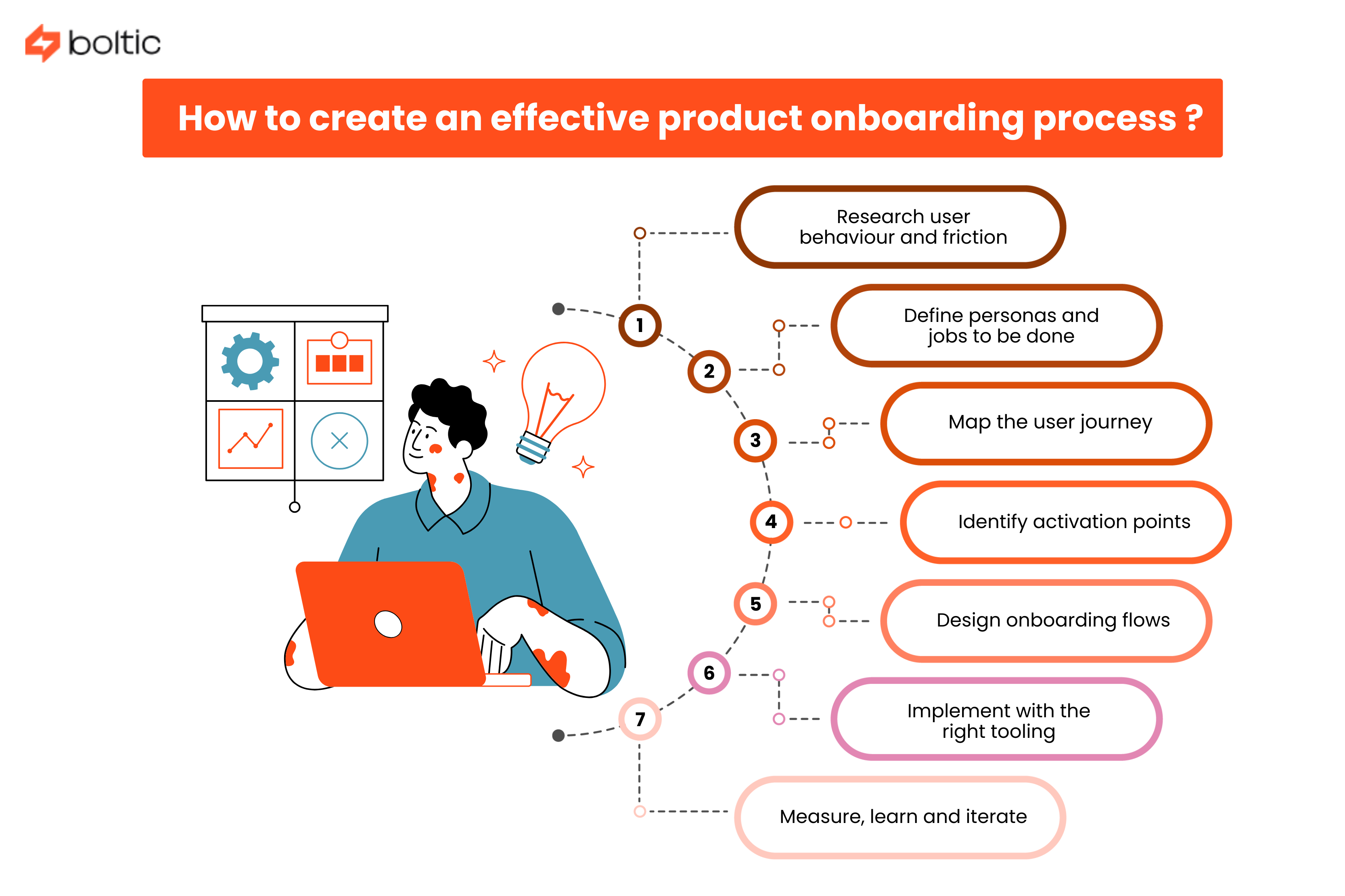
An effective onboarding process is not just intentional. It is even user-centred plus interactive. It does not begin with tools; it actually begins with understanding. A well-proven step-by-step approach looks like this:
1. Research user behaviour and friction - Study where new users drop off, get stuck or witness a disengagement.
2. Define personas and jobs to be done - Clarify who the user is and what exactly they want to attain.
3. Map the user journey - Visualise the pathway from signup to activation and beyond.
4. Identify activation points - Pinpoint the actions that show up value realisation.
5. Design onboarding flows - Zero in on the correct UX patterns and also the content for every phase.
6. Implement with the right tooling - Build flows that are flexible, testable, and easy to iterate.
7. Measure, learn and iterate - Utilise data as well as feedback to continuously refine the experience.
The best onboarding processes are not static. They evolve as user needs, products and markets change, keeping onboarding well in line with both user success and business growth.
How to Choose the Right Product Onboarding Tool for Your SaaS?
With so many onboarding tools available in the market, the challenge is not about finding out options, it is about zeroing in on the correct one for your product, team and growth model. The best decision comes from being totally aware of how onboarding fits into your broader system and not from picking the most popular name.
This section walks through a clear and practical decision process so you can zero in on a tool that supports your strategy today and still works as you scale.
Matching tools to your product stage and team skills
Begin by looking inward before comparing features.
1. Early-stage or small teams
If your team is lean as well as moves fast enough, you will benefit most from lightweight and no-code tools.
- Minimal setup as well as quick wins
- Little to zero engineering involvement
- Easy iteration as you learn from users
Such tools work well when onboarding is still evolving, and experimentation matters more than polish.
2. Growing and scaling teams
As usage grows, onboarding gets extremely complicated as well as critical.
- Role-based as well as behaviour-based flows
- Deeper analytics and segmentation
- Collaboration across product, growth and marketing
At this phase, tools that balance flexibility with structure tend to perform well.
3. Enterprise or complex products
Huge teams and high-value accounts require high-end control.
- Advanced customisation as well as governance
- Strong security with compliance support
- Integration with customer success workflows
Enterprise-grade tools might take longer to implement. But they support consistency and even scale throughout teams as well as customers.
Evaluating onboarding tools: a practical checklist
Once you narrow down candidates, use a well-structured checklist to assess them objectively.
1. UX and flexibility
- Can you design onboarding without the assistance of any engineering?
- Are tours, tooltips, and checklists customisable or can they be personalised?
- Can flows adapt based on user behaviour?
2. Analytics and insights
- Does the tool track completion as well as engagement?
- Can you connect onboarding performance to activation and retention?
- Is setup simple or resource-heavy?
3. Integrations
- Does it function with your product analytics tools?
- Can it sync with email, CRM or customer success platforms?
- Is the setup simple/straightforward or resource-heavy?
4. Governance and control
- Can you manage permissions/approvals?
- Are changes auditable and reversible?
- Does it support distinct environments (i.e., staging, production)?
5. Security and compliance
- Does it meet all your data as well as privacy requirements?
- Is it suitable for enterprise or regulated customers?
6. Pricing and scalability
- Is pricing dependent on users, events or features?
- Will expenditures scale predictably as usage grows?
7. Support and reliability
- Is documentation clear and up to date?
- How responsive is support?
- Is onboarding for your onboarding tool well-tailored?
A tool that scores well throughout such areas is far more likely to deliver value over time.
Example product onboarding tool stacks for different scenarios
In place of depending on just one tool, many teams build a small, plus-focused stack that works all together.
1. Product-led growth (PLG) SaaS
- Product onboarding tool for in-app guidance
- Product analytics for activation as well as funnels
- Lifecycle email tool for follow-ups as well as nudges
Best for self-serve products where users discover value independently.
2. Sales-assisted SaaS
- Onboarding tool for in-product education
- Analytics for usage-dependent signals as well as PQLs
- CRM and messaging tools for coordinated handoffs
Works well when sales and onboarding overlap in the course of early usage.
3. Enterprise SaaS
- Advanced onboarding platform for in-app guidance
- Product analytics at the account as well as the role level
- Customer success and knowledge tools for training/adoption
Designed for complicated products with numerous stakeholders as well as long lifecycles.
drives valuable insights
Organize your big data operations with a free forever plan
An agentic platform revolutionizing workflow management and automation through AI-driven solutions. It enables seamless tool integration, real-time decision-making, and enhanced productivity
Here’s what we do in the meeting:
- Experience Fynd Boltic's features firsthand.
- Learn how to automate your data workflows.
- Get answers to your specific questions.