

Your development team has created an amazing AI-based functionality that can change the customer experience. But it has been lingering in the backlog for months. Why? Because your DevOps team is overwhelmed by infrastructure management, your deployment pipeline has a lead time of two weeks, and your resources need three levels of approval to be provided.
You're not alone. According to DuploCloud's 2026 AI + DevOps Report, just 29% of teams are actually able to deploy on demand, despite 58% of them stating faster deployment as the highest priority.
Enter serverless computing, the technology that's quietly revolutionizing how teams build and deploy AI workflows. Rather than waiting one or two weeks to have infrastructure provisioned, you can now do it in minutes with AI-powered functions.
- No servers to maintain
- No spreadsheets of capacity planning
- No 3 AM pages about failed instances
Just write your code, connect to AI models, and let the platform handle everything else. Development teams heavily benefit from this.
In this comprehensive guide, we'll walk you through everything you need to build production-ready AI workflows without touching a single server configuration file. Let's dive in!
Why Traditional AI Infrastructure Is Holding You Back?
Before we explore the solution, let's understand the pain. Traditional AI infrastructure comes with a heavy price tag, and we're not just talking about money.
Server provisioning and management
Server provisioning and management used to take 2-3 weeks for initial setup in traditional architectures. Your team must size capacity, create EC2 instances, set up load balancers, create auto-scaling policies, and hope that they got the numbers right.
Do it wrong, and you either are putting cash into wasted resources or are having to handle performance challenges when the network loads increase.
Scaling complexities
Scaling complexities create their own nightmare. You can't just "turn up the dial" when traffic increases. Traditional scaling involves making predictions on the load, auto-scaling group configuration, health check, and pooling of connections. A single wrong setting and your whole infrastructure will spiral out of control.
Security and patching overhead
Security and patching overhead is where the real time drain happens. A comparative study of serverless and traditional architectures has shown that one of your team members can take up to 8 hours a month to do security patching alone. And that is not including vulnerability testing, compliance audits, or the weekend you always end up spending repairing a zero-day attack.
Cost of idle resources
The cost of idle resources is the silent budget killer. Traditional infrastructure runs 24/7, whether you need it or not. That expensive GPU instance you provisioned for AI model inference? It's burning through your budget at 3 AM when nobody's using it. The average annual public cloud waste is at 28% on idle or underutilized resources.
The need for specialized DevOps expertise has become a bottleneck. Finding and retaining DevOps talent with AI/ML expertise is both expensive and increasingly difficult.
Serverless Computing Explained: How It Actually Works?
So what exactly is serverless computing? Despite the name, servers definitely exist; you just don't have to think about them. Let's break down what makes serverless different.
The Function-as-a-Service (FaaS) model is the foundation. You do not deploy whole applications to servers but rather deploy single functions, which run in reaction to events. Each of the functions does one thing, like process an image, classify text, call an AI model, or update a database. Your code runs, does its job, and stops. No servers are sitting idle waiting for work.
Event-driven execution
Event-driven execution means your functions spring to life when something happens.
- A file lands in S3? Function executes.
- An API request comes in? Function executes.
- A scheduled time arrives? Function executes.
This event-driven architecture is perfect for AI workflows, which often follow a:
"trigger → process → store" pattern
High availability and automatic scaling occur on their own. Upload 1 document or 10,000 documents - the system automatically scales up to the number of function instances needed to sustain the load. By default, your code is executed in parallel in several availability zones. No auto-scaling groups to configure, no capacity planning spreadsheets needed.
Pay-per-use pricing
Pay-per-use pricing transforms your cost structure. Under AWS Lambda, you only pay for those milliseconds that your code is actually executed. Suppose that your AI workflow processes 100,000 documents today and 10 the next day, your expenses automatically adjust. That is unlike traditional infrastructure, where you pay the same regardless of whether you are processing 1 request or 1 million.
Managed services ecosystem
The managed services ecosystem extends far beyond just compute. Modern serverless platforms include:
- Managed databases (DynamoDB, Firestore)
- Queues (SQS, Pub/Sub)
- AI services (Amazon Bedrock, Azure OpenAI)
- Monitoring tools
All designed to work together without configuration hell.
Essential Serverless Components for AI Workflows
Building serverless AI workflows is like assembling with LEGO blocks. Each component has a specific role, and they snap together easily. Here's your toolkit:
Designing Your First Serverless AI Workflow
Let's get practical. The first step towards creating your first workflow is to select the appropriate use case.
The selection of use cases should be based on the workflows with defined inputs and outputs with variable load profiles. Ideal candidates include:
- Document processing: PDF text extraction, document classification, and text summary.
- Enriching data: Data context, sentiment, and entity extraction of records.
- Creation of content: Personalized emails, automated reports, creating of images.
Begin small and prove value before expanding. Don't try to rebuild your entire AI infrastructure as serverless on day one.
Event trigger identification
Event trigger identification determines what kicks off your workflow.
- In the case of document processing, it is a file upload to S3.
- To enrich data, it could be a new record in DynamoDB or a queue message.
- For scheduled workflows, CloudWatch Events or Cloud Scheduler can trigger functions on a cron schedule.
The key is identifying the "moment" when work needs to happen.
Function decomposition and orchestration
Function decomposition and orchestration are where you break your workflow into discrete steps. Let's say you're building an automated content moderation system. You might have:
- File upload triggers processUpload function
- processUpload sends file to moderation AI (Rekognition, GPT-4V)
- AI response triggers evaluateContent function
- evaluateContent updates the database and notifies reviewers if needed
Every task is done properly by each function. It simplifies debugging, enables independent scaling, and enables you to change components without necessarily rewriting everything.
State management strategies
State management strategies solve the problem of functions not remembering previous executions. In the case of simple workflows, the state may be passed as an event payload. In complicated workflows, store state in DynamoDB or managed orchestration services such as AWS Step Functions.
Boltic makes it easier to manage a state through visual workflow builders, which automatically manage state transitions.
Error handling and retries
Things always go wrong in running production systems; your workflow should be made resilient. Dead Letter Queues (DLQs) enable failed execution of functions to be captured in order to prevent the disappearance of requests.
When making external API calls, apply the exponential backoff with error-retry logic to gracefully deal with temporary problems. When you are using Step Functions, make use of the built-in retry plans for various types of failures.
Connecting Serverless Functions to AI Models: Best Practices
Your serverless functions need to talk to AI models. Here's how to do it effectively.
Calling API-Based Models (OpenAI, Anthropic, Cohere)
Keep connections fast and secure:
- Use connection pooling to avoid new HTTPS handshakes on every invocation
- Store API keys in Secrets Manager or Key Vault, never in code
- Add timeouts and retries for long model responses
- Stream responses when possible to reduce perceived latency
Serverless Model Inference (SageMaker Serverless, Vertex AI)
If you're deploying custom models:
- Automatically scale from zero to high concurrency
- Pay only for inference time
- Benefit from improved cold start performance
- Ideal for workloads that aren’t constantly active
Prompt Management & Versioning
As workflows grow, prompts need structure:
- Store prompts centrally (S3, database, or prompt tools)
- Version them like code
- Track outputs per version
- Enable A/B testing and quick rollbacks
Performance & Cost Optimization
Reduce latency and cost with:
- Response streaming and chunking for long outputs
- Caching common queries in Redis or DynamoDB
- Caching of repeated requests (with a short-lived TTL, e.g., 24-hour TTL).
Intelligent caching by itself can save the cost of AI significantly.
Serverless Workflow Orchestration: Managing Complex AI Pipelines
As workflows grow complex, you need orchestration tools that match serverless principles.
Step Functions, Cloud Workflows, Durable Functions
Orchestration services that organize various functions without servers are called Step Functions, Cloud Workflows, and Durable Functions. Step Functions, as one example, allow you to describe workflows in JSON as states (Task, Choice, Parallel, Wait). It is used to manage state transitions, retries, and error processing as you concentrate on business logic.
Visual workflow builders
Workflow orchestration is also accessible to non-developers with visual workflow builders such as Boltic's workflow builder. The drag-and-drop interfaces allow you to assemble functions, add conditional logic, and set up error handling without writing orchestration code. This helps in AI workflow development, and time-to-production is no longer in weeks, but days.
Parallel processing patterns
Parallel processing patterns unlock massive scalability. Use Map states in Step Functions to process arrays in parallel. Perfect for batch document processing or dataset transformation. A single workflow can spawn hundreds of parallel branches, each processing independently. This is where serverless shines: no manual cluster management required.
Human-in-the-loop approvals
Approaches that involve human-in-the-loop approvals have been built to blend through callback patterns. Where your AI process requires human validation (content flagged as requiring review, high-value transaction confirmation), your workflow halts, issues a notification with a callback URL, and restarts after the human has replied. The orchestration service retains state between the pause, in minutes, hours, or days.
Long-running workflow management
Long-running workflow management handles processes that span hours or days. Step Functions Standard workflows run up to one year. Durable Functions support infinite duration through checkpointing. This enables complex AI workflows like multi-stage content creation, gradual model training, or scheduled batch jobs that run over extended periods.
Proven Data Pipeline Patterns for Serverless AI
Let's look at proven patterns for serverless AI pipelines:
- S3 trigger → Lambda → AI model → database is the most common pattern. A file that is uploaded to S3 invokes a Lambda function. The function reads the document, provides an AI API (sentiment, classification, extraction), and stores the results in DynamoDB. This process works in seconds with zero standing infrastructure.
Some other patterns include:
- Stream processing (Kinesis/EventBridge)
Works with real-time information (such as user activity or sensor data), automatically invokes Lambda functions, performs AI analysis in real-time, and stores the results in dashboards or alerts.
- Scheduled batch processing
AI jobs are scheduled to run on a fixed time schedule (hourly, daily, etc.), accumulated data is processed in batches, and comprises summaries, reports, or predictions.
- Fan-out / fan-in pattern
Splits a request to several functions to break down tasks into parallel analysis, after which results are put back together into a single final response to be processed more quickly.
- CDC and data synchronization
Triggers workflows when database record changes and keeps AI systems up-to-date without regular polling and integrations.
Securing Serverless AI Workflows: Authentication & Compliance
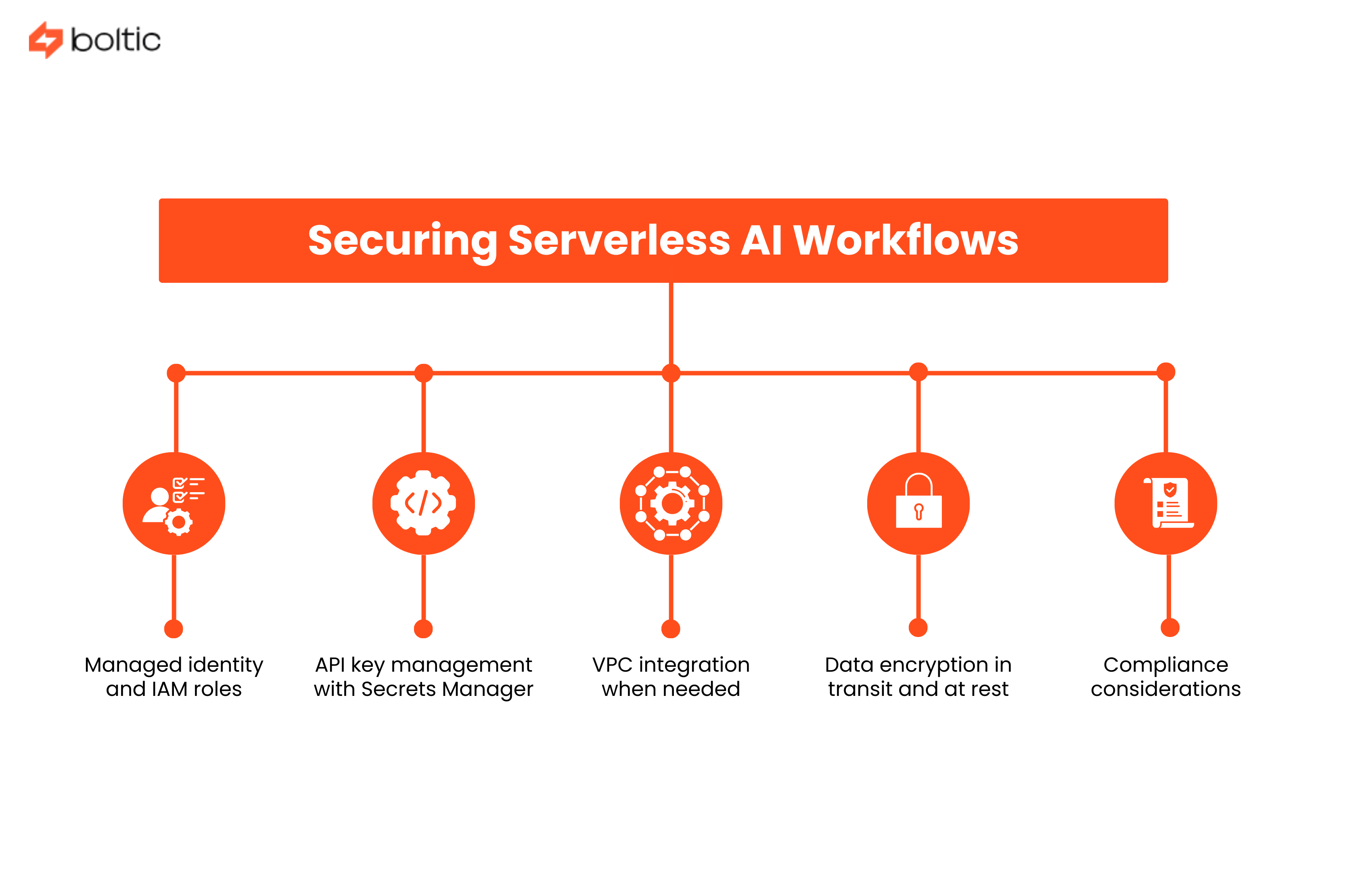
Serverless doesn't mean security-less. Here's how to lock things down:
- Managed identity and IAM roles: Lambda functions assume IAM roles that grant specific permissions. No credentials in code, no secrets to rotate, just policy-based permissions.
- API key management with Secrets Manager: Store third-party API keys in AWS Secrets Manager or Azure Key Vault. Functions retrieve secrets at runtime with automatic rotation support.
- VPC integration when needed: Most serverless functions don't need VPCs, but connecting to private databases or legacy systems requires VPC configuration. Modern services largely reduce cold start penalties.
- Data encryption in transit and at rest: Enable encryption for S3 buckets, DynamoDB tables, and data streams. Use TLS 1.2+ for all external API calls.
- Compliance considerations: GDPR requires data residency controls. HIPAA demands encryption, audit logging, and access controls. SOC 2 needs centralized logging and monitoring.
Monitoring & Debugging Serverless AI: Tools & Strategies
What you can't measure, you can't improve. Here's how to gain visibility.
- CloudWatch, Application Insights, and Cloud Logging offer observability by default. Lambda records to CloudWatch automatically with invocations, duration, memory usage, and errors of the functions. Create log groups with retention policies, turn on X-Ray tracing on distributed traces, and create metric filters to filter out business metrics in logs.
- Serverless tracing bridges the gap between invocations of functions. AWS X-Ray and Google Cloud Trace graph request flows over your AI workflow.
By requesting 5 functions and 3 AI APIs, you can trace and see where time is spent and where failures happen.
AI workflow KPIs have custom metrics, which measure what is important to your business. Log custom metrics like:
- AI model accuracy rates
- Processing time per document
- Cost per AI request
- Error rates by model
- Queue depths and processing lag
Create CloudWatch dashboards showing AI workflow health at a glance.
Alerting and incident response
Alerting and incident response catch problems before users report the problem. Monitor error rate spikes, untypical latency, Business-level outages, and cost anomalies using alarms. Integrate with PagerDuty, Opsgenie, or Slack to be notified instantly. Write runbooks on common failure situations.
Cost monitoring and budget alerts
Budget alerts and cost monitoring eliminate unexpected bills. Set up AWS Budgets or Azure Cost Management alerts at 50%, 80%, and 100% of the monthly expected spend. Tag functions by team or project for cost attribution. Monitor AI API usage separately since model calls often dominate costs.
Serverless Performance Optimization
Making your serverless AI workflows fast and efficient requires some tuning. Use these strategies in the optimization area:
Serverless Cost Management: How to Avoid Surprise Bills
Serverless can be incredibly cheap or surprisingly expensive. Here's how to stay in the former category.
Understanding serverless pricing models
Serverless pricing model knowledge avoids unpleasant surprises. Lambda charges for requests ($0.20 per million) and compute time ($0.0000166667 per GB-second). A 1GB memory and 100ms function consumes an invocation charge of 0.00000167 dollars. The cost of an AI API (typically costing $0.002-0.03 per request) is typically much higher than that of serverless compute, so optimize model calls initially.
Free tier utilization
Free tier utilization helps startups and small projects. AWS Lambda includes 1 million free requests and 400,000 GB-seconds per month, enough for many proof-of-concept AI workflows. Azure Functions offers similar free tiers. Use these generously during development and testing.
Cost comparison with traditional infrastructure reveals serverless advantages. Research analyzing real-world deployments found serverless architectures deliver 70-85% cost reduction for variable workloads.
Optimization techniques for better cost management
These include:
- Right-sizing function memory based on actual usage patterns
- Using reserved concurrency for predictable workloads
- Implementing caching layers to reduce AI API calls
- Batching AI requests when real-time responses aren't required
Unexpected cost scenarios and prevention
Unexpected cost inputs and mitigation include runaway functions handling malicious input, unexpected retry loops, and failure to clean up test resources. Establish some concurrency limits, apply idempotency, apply DLQs to economy retries, and automatically carry out cleaning up of resources with tags and lifecycle policies.
Common Serverless Pitfalls (And How to Avoid Them)
Learn from others' mistakes before making your own.
Timeout and memory limit issues
Problems with timeouts and memory limits take place when functions exceed the default limits. The calls made by the AI model may require 30+ seconds, whereas the default is 3 seconds.
Set timeouts to the desired length (up to 15 minutes with Lambda). Check memory usage and set; shortage of memory results in cryptic failures.
Concurrent execution limits
Concurrent execution limits can throttle your workflow unexpectedly. Each AWS account has a regional Lambda concurrency limit (typically 1,000 concurrent executions by default). Requests increase before going to production.
Use reserved concurrency to guarantee availability for critical functions while preventing runaway functions from consuming all capacity.
State management across invocations
Serverless newcomers are stalled by state management across invocations. Functions are stateless - do not expect files written to /tmp to be remembered between calls, or in-memory caches to be remembered between calls. Store state with DynamoDB, S3, or with orchestration services.
Third-party API rate limiting
Exponential backoff and retry logic is needed in third-party API rate limiting. Rate limits (60 requests/minute, 100,000 tokens/day) are commonly enforced by the AI APIs. To solve this,
- Add exponential backoff retry logic
- Request queueing to smooth traffic
- API quota monitoring
A single API request function can cause rate limits due to traffic bursts.
Vendor lock-in concerns
The issue of vendor lock-in is real and can be controlled. Utilize multi-cloud orchestration providers such as Boltic that offer one interface over AWS, Azure, and Google Cloud. Store business logic in portable code and vendor-specific settings in external files.
Real-World Serverless Use Cases
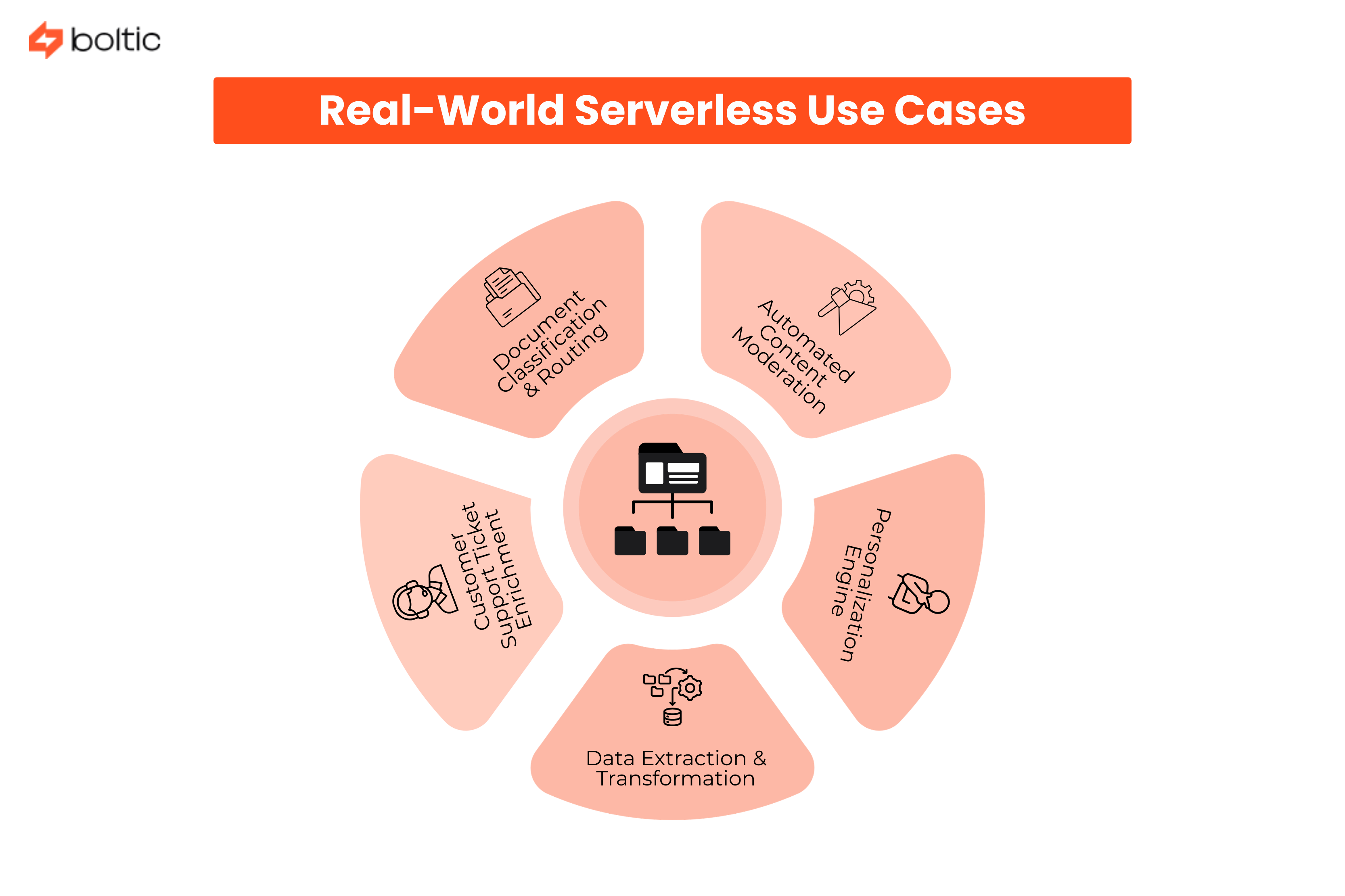
Let's look at concrete implementations:
1. Document Classification & Routing
An insurance company handles claims through an event-based workflow. The uploaded documents to S3 invoke Lambda functions:
- Processing text (Textract)
- Document type (SageMaker)
- Entity extraction (LLM)
- Directing results to the corresponding queue.
The system is fully serverless and needs no always-on infrastructure and scales automatically as the volume of claims increases.
2. Automated Content Moderation
User-generated content is moderated via a social platform by using serverless AI. Rekognition is used to perform a visual check on uploaded images, and language models are used to investigate policy violations in texts that are uploaded. Flagged content moves to human review queues. The architecture scales dynamically based on submission traffic.
3. Customer Support Ticket Enrichment
A SaaS company enhances support records by using an event-based pipeline. New ticket triggers:
- Classification
- Entity extraction
- Search for vectors against knowledge bases
- Automatic routing to specialists
The workflow is managed by serverless functions and controlled AI services.
4. Data Extraction & Transformation
A financial firm uses Step Functions to orchestrate document processing workflows. OCR extracts raw data, AI models identify key entities, validation runs against internal databases, and structured outputs are loaded into analytics systems. The pipeline handles large document volumes without dedicated infrastructure.
5. Personalization Engine
Streaming triggers on an e-learning platform update user profiles and create expert-like course suggestions. Lambda functions process user activity events, call recommendation models, and refresh cached results. The system scales automatically as user engagement increases.
When NOT to Use Serverless for AI Workflows
Serverless is powerful but not universal. Know when to use other approaches:
- Consistently high throughput workloads: Predictable, sustained traffic at 1,000+ requests/second may cost less on dedicated servers
- Model training that is GPU-intensive: It needs special hardware and processes that take extended durations.
- Ultra-low latency requirements: Less than 10ms requirements are problematic with cold starts on serverless.
- Complex stateful applications: Long-lived connections and in-memory state don't fit the serverless model.
- Team expertise and preferences: Deep Kubernetes (K8s) expertise may make containers more productive.
Serverless Migration Strategy: From Legacy to Modern AI
Ready to make the jump? Here's how to do it intelligently.
- Starting with new workflows vs migrating existing determines your approach.
By default, new AI workflows must be serverless unless there is some particular reason. Be selective, migrate stateless event-driven components first in the case of existing workloads. Leave complicated stateful systems aside, or use hybrid systems.
Strangler Fig Pattern for Gradual Migration
You do not need to replace your entire system, but rather wrap it in small serverless functions, which, over time, replace responsibilities. Add new functionality without needing to modify the serverless application, and gradually move traffic off the old system.
With time, the legacy system is replaced by the new layer bit by bit. This reduces risk and is particularly effective when re-architecturing large monolithic AI workflows.
Multi-Cloud and Hybrid Approaches
You don’t have to choose one cloud provider. Serverless workflows can span AWS, Azure, and Google Cloud if needed.
It is also possible to retain existing on-premise AI models and interconnect them via APIs. In hybrid systems, serverless is used to perform orchestration and scaling, and specialized systems are used to execute heavy or sensitive workloads.
This provides you with the flexibility without compelling you to revamp the entire infrastructure.
Testing and Validation in Serverless Environments
The mindset needed to test serverless systems is slightly different.
Environments can always be replicated using infrastructure-as-code tools such as Terraform or CloudFormation. Run integration tests that spin up some temporary resources, run workflows, and shut everything down afterward.
Also, monitor more aggressively during development. Since serverless scales automatically, small issues can grow quickly if unnoticed.
Wrapping Up: Your Path to Serverless AI
It is not only possible to build AI workflows without DevOps, but it is increasingly the new standard with the new generation of teams. Serverless computing eliminates the bottleneck between thought and creation, allowing developers to build AI features without having to wait weeks to build infrastructure.
As you move forward, remember this checklist:
- Begin with one big impactful workflow instead of enterprise-wide migration efforts.
- Measures cost, latency, error rates, and business metrics.
- Experimentation is cheap with serverless, iterate quickly.
- Plan for optimization, initial implementations won't be perfect, and that's okay.
- Leverage platforms like Boltic that simplify multi-cloud serverless orchestration.
The future of AI infrastructure isn't replacing DevOps teams; it's augmenting them with automated platforms that handle the undifferentiated heavy lifting. Serverless computing is that platform.
Ready to build AI workflows without the DevOps headache? Explore Boltic's serverless workflow platform and see how visual orchestration, multi-cloud support, and pre-built integrations can take you from concept to production in days, not months.
The serverless AI revolution is here. The only question is whether you'll lead it or follow when your competitors are ahead.
drives valuable insights
Organize your big data operations with a free forever plan
An agentic platform revolutionizing workflow management and automation through AI-driven solutions. It enables seamless tool integration, real-time decision-making, and enhanced productivity
Here’s what we do in the meeting:
- Experience Fynd Boltic's features firsthand.
- Learn how to automate your data workflows.
- Get answers to your specific questions.