
Most inboxes are crowded. Not because brands send too many emails, but because they send the wrong emails at the wrong time.
A discount email arrives days after a purchase. A reminder lands when the intent is already gone. A “Hey there” message shows up when the brand clearly knows your name.
This is the real problem email teams face today. Not volume. But timing and relevance.
That is where email automation changes everything.
Email is not like a broadcast channel anymore because automation turns it into a responsive system. The system listens to user behavior and reacts instantly. No manual follow-ups. No guesswork. Just timely, contextual communication that feels intentional.
It is important to know:
- What email automation really means today
- Why email marketing automation drives better engagement and revenue
- How to set it up step by step
- The best email automation platforms to consider in 2025
- And where workflow tools like Boltic fit in
Let’s start with the basics.
What is Email Automation?
Email automation is the process of sending emails automatically based on predefined rules, triggers, or user behavior, without manually sending each message.
Instead of asking “When should we email?”, automation asks:
“What did the user just do-and what do they need next?”
Common triggers include:
- Signing up for a newsletter
- Creating an account
- Abandoning a cart
- Completing a purchase
- Becoming inactive
- A subscription nearing renewal
These triggers initiate workflows that run quietly in the background with email marketing automation.
A simple example:
- Trigger: User signs up
- Action: Instantly send a welcome email
Scale this logic across several users and multiple touchpoints. Then you will get that automated email marketing that adapts to each user’s journey.
How Email Marketing Automation Works

At its core, email marketing automation follows a simple structure:
Trigger → Condition → Action
For example:
- Trigger: User abandons cart
- Condition: Cart value above ₹2,000
- Action: Send a reminder email with a limited-time offer
Modern automation tools also support:
- Delays (send after 30 minutes, 24 hours, or 3 days)
- IF/ELSE branching
- Dynamic personalization
- Integration with CRMs, analytics, and databases
The result? Emails that feel relevant, because they are.
Why email automation matters more than ever
Manual campaigns struggle to keep up with modern expectations. Automated ones don’t.
Here’s why automated email marketing has become foundational.
1. Higher engagement through timing
Triggered emails regularly perform much better than the scheduled campaigns that are in bulk. This is because they arrive when interest is high already.
Did you know? 90% of consumers find personalized content very or somewhat appealing, yet most inboxes are still filled with generic emails.
Automation ensures emails arrive in context, not after it.
2. Personalization at scale
Customers now assume that there is personalization. With email automation, you can personalize messages using:
- Name and location
- Browsing behavior
- Purchase history
- Product interest
- Subscription status
Instead of:
“Hey there, check this out.”
You send:
“Hi Alex, the sneakers you viewed yesterday are now 20% off.”
This isn’t guesswork. This isn’t guesswork. Personalized recommendations usage in a campaign tends to greatly increase sales per email open.
That’s the real power of email marketing automation: relevance without manual effort.
3. Time and cost efficiency
Once workflows are live, they run continuously.
That means:
- No repeated scheduling
- No manual list segmentation
- No follow-up reminders slipping through
Teams get enough time to spend in improving strategy and customer experience. They spend less time executing.
4. Better Lead Nurturing
Not every visitor is ready to buy.
Automated email marketing supports lead nurturing by:
- Educating prospects gradually
- Sending content based on demonstrated interest
- Moving users forward without pressure
Drip campaigns are especially effective here. They deliver purposeful messages only when users show signals of readiness.
5. Consistency Across the Customer Lifecycle
Automation, once set, keeps consistency alive. And in doing so it does not rely on human memory. Every new subscriber gets welcomed. Every buyer receives order updates. Every inactive user gets re-engagement nudges.
That consistency builds trust, quietly and reliably.
Common Email Automation Use Cases
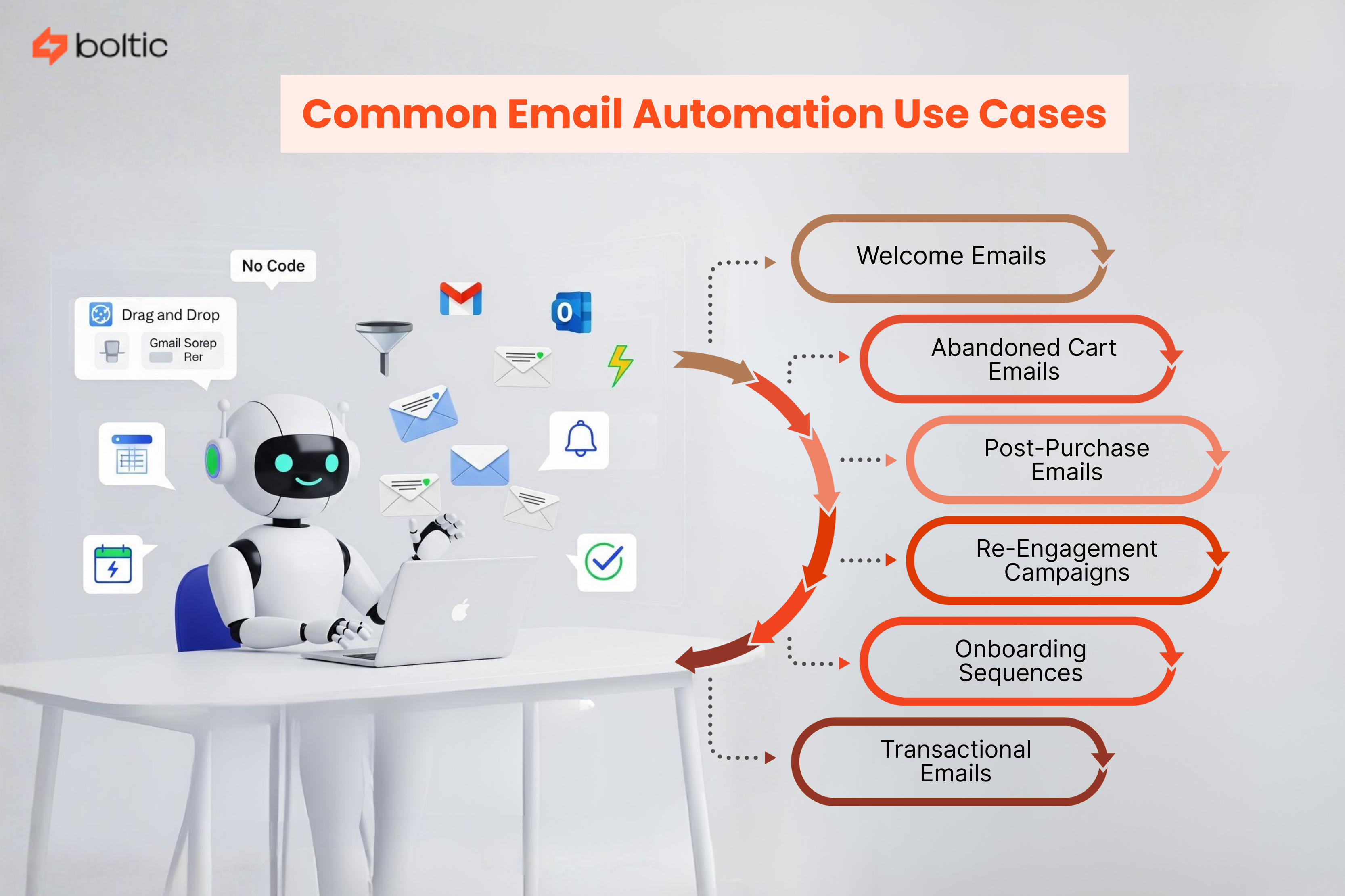
Email automation spans far beyond promotional campaigns. It supports the entire customer lifecycle.
Welcome Emails
Triggered when someone subscribes or creates an account.
Why this matters:
- 74% of people expect a welcome email after signing up
- Welcome emails get 4× more reads and 5× more clicks
- They generate up to 320% more revenue per email than standard campaigns
A strong welcome sets the tone for everything that follows.
Abandoned Cart Emails
Triggered when a shopper leaves without completing checkout.
Nearly 70% of e-commerce shoppers abandon their carts, often due to:
- Unexpected shipping costs
- Forced account creation
- Security concerns
You need timely automated reminders to deal with that. This way you can recover high-intent revenue minus manual chasing.
Post-Purchase Emails
Order confirmations, shipping updates, and review requests.
These emails:
- Reduce support queries
- Reinforce trust
- Keep customers informed
They are transactional, but critical.
Re-Engagement Campaigns
Triggered after inactivity (30, 60, or 90 days). Re-engagement emails help brands reconnect with dormant users, often at a fraction of the cost of acquiring new ones.
Onboarding Sequences
Especially valuable for SaaS and subscriptions. Automation guides users through:
- Setup steps
- Feature discovery
- Early wins
Reducing time-to-value improves retention.
Transactional Emails
OTPs, alerts, reminders, security notifications. These emails demand speed and reliability. It makes automation essential, not optional.
Single Email Automation vs Email Series
Not every automation needs a long sequence. The choice depends on intent and not volume.
7 Practical Steps to Set Up Email Automation
These steps apply to most email automation platforms.
Common Email Automation Mistakes at Each Step (And How to Avoid Them)
Even well-intentioned automation can hurt the customer experience if the basics are ignored. Here are the most common mistakes teams make at each step and why they matter.
Choosing the Wrong Tool in Step 1
The common mistakes:
- Picking a tool because it is popular, not because it fits the use case
- Using newsletter-first tools for logic-heavy workflows
- Overpaying for features that aren’t needed
The Problem:
Automation becomes frustrating when the tool can’t handle your real business logic.
The Fixes:
- Visual workflow builder lets you orchestrate complex triggers and conditions without coding.
- Connect existing Gmail, SendGrid, SES (no need to replace your email stack)
- Scale only what you need, paying per execution rather than by bulk volume
Importing a Dirty or Unsegmented List in Step 2
The common mistakes:
- Uploading old or inactive contacts
- Skipping consent checks
- Treating all users as a single audience
The Problem:
Dirty lists reduce engagement, increase bounces, and hurt deliverability.
The Fixes:
- Use real-time integration with CRM, Shopify, Stripe, Calendly, etc. → lists are always updated automatically
- Tables in Boltic store clean, live contacts with opt-in status
- Apply segmentation dynamically using workflow conditions
Enabling Partial or No Tracking in Step 3
The common mistakes:
- Tracking only email opens
- Ignoring website or purchase behavior
- Using delayed data syncs
The Problem:
Without behavioral triggers, emails feel random and irrelevant.
The Fixes:
- Boltic workflows respond to live events: checkout created, order paid, subscription expiring
- Combine AI content + data for hyper-personalized messages based on what the user just did
- Real-time triggers eliminate blind sending
Creating Static Segments in Step 4
The common mistakes:
- Manual list updates
- One-off filters instead of dynamic rules
- Forgetting to remove converted or inactive users
The Problem:
Static segments become outdated quickly. Emails lose relevance.
The Fixes:
- Dynamic segmentation inside workflows (IF/ELSE, loops, AI-generated rules)
- Users move automatically between segments as their behavior changes
- Exit conditions prevent redundant emails
Designing Too Many Templates Too Early in Step 5
The common mistakes:
- Over-designing before testing
- Ignoring mobile optimization
- Prioritizing visuals over clarity
The Problem:
Complex templates are harder to scale and iterate.
The Fixes:
- Build reusable Gmail templates with placeholders ({{first_name}}, {{product}})
- AI can generate dynamic text blocks on the fly → fewer static templates needed
- Mobile-friendly layouts built automatically via Gmail or SendGrid
Overbuilding Workflows in Step 6
The common mistakes:
- Creating overly complex, multi-branch flows too early
- Automating every possible scenario
- Forgetting exit or stop conditions
The Problem:
Users get irrelevant messages, increasing unsubscribes and complaints.
The Fixes:
- Start small with one workflow, like OTP, abandoned cart, or post-purchase
- Add complexity gradually using conditional logic, delays, loops
- Stop conditions built-in (invoice.payment_succeeded, clicked unsubscribe, etc.)
Measuring Vanity Metrics Only in Step 7
The common mistakes:
- Obsessing over open rates
- Ignoring downstream conversions
- Never revisiting workflows
The Problem:
Without meaningful KPIs, automation performance plateaus or drops.
The Fixes:
- Track outcomes like click-to-purchase, review submissions, subscription renewals
- Use Zapier/Slack/Webhook integrations to report real-time results to your team
- Adjust AI-driven email content automatically based on user response
Best Email Automation Platforms in 2025
The best email automation platforms depend on workflow complexity, not popularity.
Where Boltic Fits Into Email Automation
Boltic takes a different approach. It’s not an ESP. It’s an AI-native workflow engine that connects your existing email service with live business data.
You design the logic. Boltic orchestrates the workflow. Your email provider handles delivery.
What You Can Build With Boltic
Common email automation use cases include:
- OTP login emails
- Abandoned cart nudges with AI-generated copy
- Post-purchase review requests
- Subscription renewal reminders
All powered by real-time data and not static lists.
When to Use Boltic vs Traditional ESPs
Choose Boltic if you:
- Need workflows driven by live data
- Want AI-personalized content
- Prefer keeping the existing email infrastructure
Use classic ESPs if you:
- Send massive newsletter volumes
- Need drag-and-drop design tools
Many teams use both: ESP for broadcasts, Boltic for logic-heavy automation.
Avoiding Spam Folders: A Quick Checklist
- Authenticate domain (SPF, DKIM, DMARC)
- Use double opt-in
- Avoid spammy subject lines
- Include unsubscribe links
- Clean inactive contacts regularly
Deliverability rewards consistency.
Final Thoughts
Email automation is no longer about sending more emails. It is about sending fewer, smarter emails that arrive at the right moment, with the right context. When automation is done well, it respects attention, removes friction, and quietly improves the customer experience across the entire lifecycle.
By automating repetitive follow-ups, transactional messages, and behavior-based triggers, teams free themselves from manual execution and focus on strategy, creativity, and growth. The result is better engagement, higher conversions, and stronger long-term relationships without inbox fatigue.
Workflow-driven platforms like Boltic make modern email automation possible by connecting live business data with your existing email tools. Instead of static lists and delayed syncs, automation runs on real-time signals, ensuring every email stays relevant and timely.
Ready to move beyond batch-and-blast emails? Start building logic-driven email automation with Boltic and turn your email channel into a responsive, high-impact system.
drives valuable insights
Organize your big data operations with a free forever plan
An agentic platform revolutionizing workflow management and automation through AI-driven solutions. It enables seamless tool integration, real-time decision-making, and enhanced productivity
Here’s what we do in the meeting:
- Experience Fynd Boltic's features firsthand.
- Learn how to automate your data workflows.
- Get answers to your specific questions.